# Translation Agent

![ta.webp](https://flowcourier.com/media/w0endmj2/ta.webp)

## Agent built on top of Umbraco AI with translation, proofreading and SEO capabilities. Hooked up to approval flows.

<div class="row bg-light">

    <div class="container py-5">
    <div class="row">
        <!-- g-4 adds gutter (spacing) between columns -->
        <!-- What it does Card -->
        <div class="col-md-4 d-flex align-items-stretch">
            <div class="card flex-grow-1 border-0 rounded-0 ">
                <!-- p-3 adds padding inside the card -->
                <div class=" d-flex justify-content-center align-items-center" style="height: 100px;">
                    <i class="fa-regular fa-pen-to-square fa-3x "></i> <!-- content actions -->
                </div>
                <div class="card-body">
                    <h4 class="card-title">One Click, Many Actions</h4>
                    <p class="card-text fs-6">
                        Translate a page into any language you run. Improve its SEO. Check spelling and fix grammar. Each action is one click on the content in front of you. The agent does the work, you stay in control.
                    </p>
                </div>
            </div>
        </div>

        <!-- Knowledge / grounding Card -->
        <div class="col-md-4 d-flex align-items-stretch">
            <div class="card flex-grow-1 border-0 rounded-0 ">
                <div class="d-flex justify-content-center align-items-center" style="height: 100px;">
                    <i class="fa-regular fa-book-open fa-3x"></i> <!-- brand guide and glossary -->
                </div>
                <div class="card-body">
                    <h4 class="card-title">Connected to Your Knowledge</h4>
                    <p class="card-text fs-6">
                        The agent connects to Azure AI Foundry, where we set up your tone, style, and brand guide. It writes the way your company writes. Add translation rules too. Some terms should always translate the same way, every time. Your glossary becomes the agent's rules.
                    </p>
                </div>
            </div>
        </div>

        <!-- Approval workflow Card -->
        <div class="col-md-4 d-flex align-items-stretch">
            <div class="card flex-grow-1 border-0 rounded-0 ">
                <div class="d-flex justify-content-center align-items-center" style="height: 100px;">
                    <i class="fa-regular fa-circle-check fa-3x text-black"></i> <!-- approval -->
                </div>
                <div class="card-body">
                    <h4 class="card-title">From Draft to Approved</h4>
                    <p class="card-text fs-6">
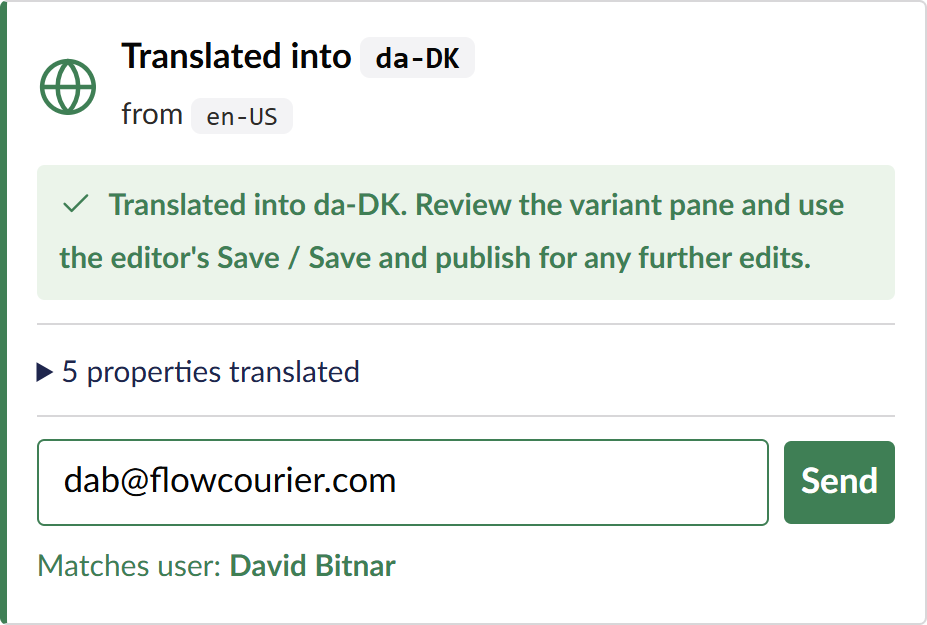
                        Translation is not finished when it is translated. Send the content for approval in a few clicks. We find your reviewers in Umbraco, so you just select them. They get a link and review in easy steps. Approved content goes live. Nothing else does.
                    </p>
                </div>
            </div>
        </div>
    </div>
    </div>
</div>

<!-- How it works Section -->
<div class="row">
<section class="py-5 bg-white">
    <div class="container">
        <div class="row align-items-start">
            <div class="col-md-7 order-md-1">
                <img src="/media/v1oowosz/umbracoai.gif" class="img-fluid w-100 shadow-sm" />
            </div>
            <div class="col-md-5 order-md-2">
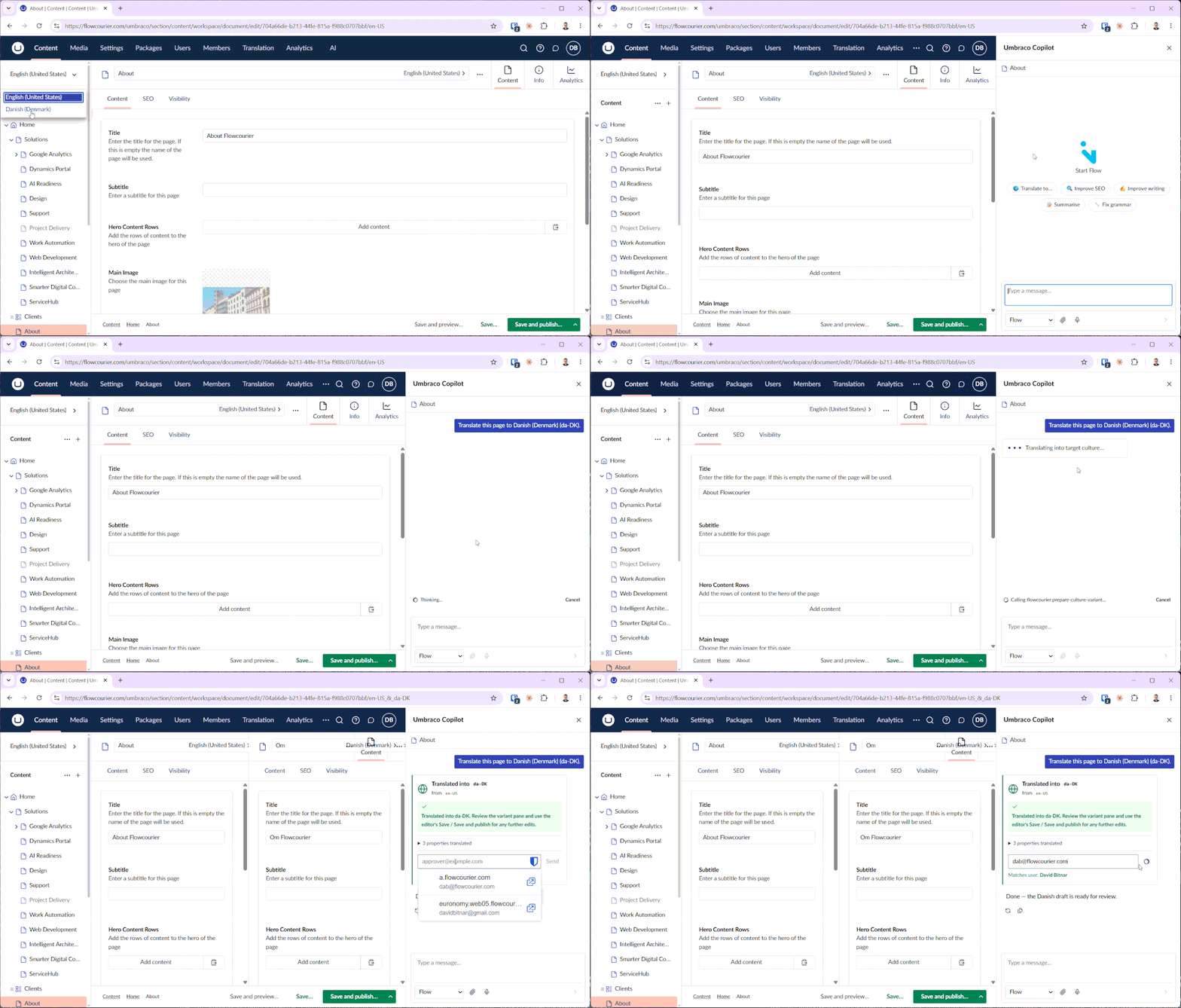
                <h4 class="mt-0 mx-3 mb-3 fs-3">The agent sees every language you have set up in Umbraco. It drafts a translation for each one, from your default language. It can even handle complex content types, like Block Lists in Umbraco. You decide what happens next. Publish it now, or send it for approval first.</h4>
            </div>
        </div>
    </div>
</section>
</div>

<!-- How it works Section -->
<div class="row">
<section class="py-5 bg-light">
    <div class="container">
        <div class="row align-items-start">
            <div class="col-md-5 order-md-1">
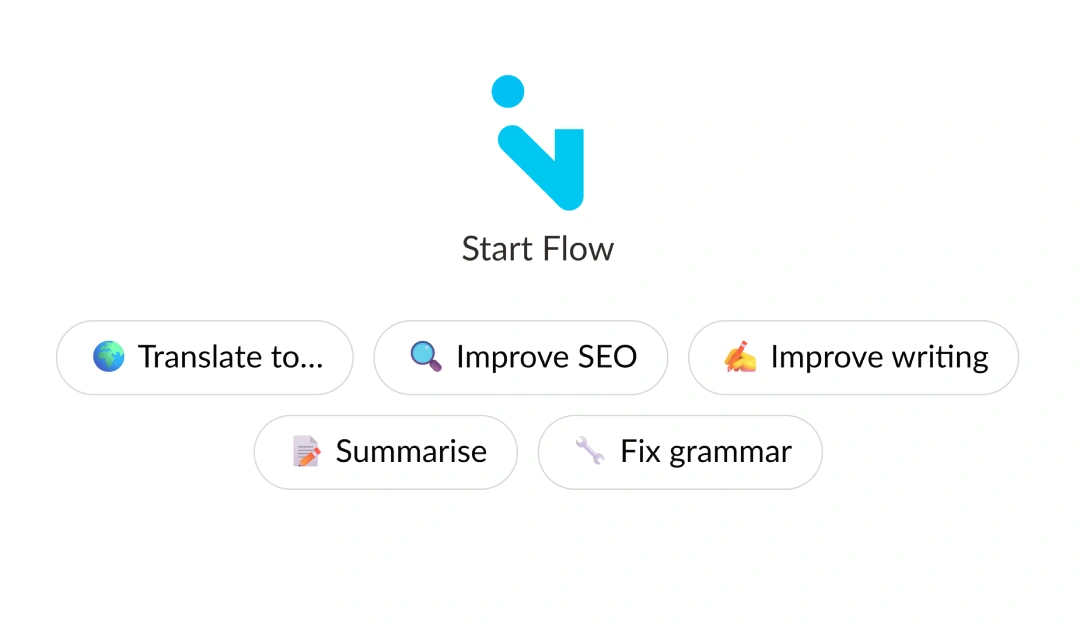
                <h4 class="mt-0 mx-3 mb-3 fs-3">We did not want a chatty agent. We wanted one that acts. So we built it with buttons, instead of a text box. Each action follows a strict path, with little room for error. You see your options and pick one.</h4>
            </div>
            <div class="col-md-7 order-md-2">
                <img src="/media/pb2hh1x5/flowai.webp" class="img-fluid w-100 shadow-sm" />
            </div>
        </div>
    </div>
</section>
</div>

<!-- Approval flow Section -->
<div class="row">
<section class="py-5 bg-white">
    <div class="container">
        <div class="row align-items-start">
            <div class="col-md-5 order-md-2">
                <h4 class="mt-0 mx-3 mb-3 fs-3">Sending a translation for review is one step. We find your registered Umbraco users, and you pick a reviewer. They receive an email with link to the page in Umbraco. No new tool to learn. No long email thread.</h4>
            </div>
            <div class="col-md-7 order-md-1">
                <img src="/media/kzej5yg2/card.png" alt="Adaptive card showing a translation sent to a registered Umbraco user for approval" class="img-fluid w-100 shadow-sm" />
            </div>
        </div>
    </div>
</section>
</div>

<!-- Knowledge base Section -->
<div class="row">
<section class="py-5 bg-light">
    <div class="container">
        <div class="row align-items-center">
            <div class="col-md-5 order-md-1">
                <h4 class="mt-0 mx-3 mb-3 fs-3">The agent works from your knowledge base in Azure AI Foundry or OpenAI. That is where we set your brand, your tone, and your dictionary. A term you always translate the same way stays the same way. The agent writes like your company, not like a generic model.</h4>
            </div>
            <div class="col-md-7 order-md-2">
                <div class="row align-items-center g-4">
                    <div class="col-4">
                        <img src="/media/ejfmo3gh/azure-ai-foundry.webp" alt="Azure AI Foundry" class="img-fluid w-100 shadow-sm" />
                    </div>
                    <div class="col-4">
                        <img src="/media/5kqjxkwb/openai.webp" alt="OpenAI" class="img-fluid w-100 shadow-sm" />
                    </div>
                    <div class="col-4">
                        <img src="/media/xyxgsz2s/claude.webp" alt="Claude" class="img-fluid w-100 shadow-sm" />
                    </div>
                </div>
            </div>
        </div>
    </div>
</section>
</div>

<div class="row bg-white">
<section>
    <div class="card-body">
        <h3 class="fs-4 text-center">
 <a href="/contact/">Contact us</a> for demo of our Translation Agent.
        </h3>
    </div>
</section>
</div>

### Agent built on top of Umbraco AI with translation, proofreading and SEO capabilities. Hooked up to approval flows.

[Request Demo](https://flowcourier.com/contact)