WordPress 7.0 and AI: what really changes when AI moves into core
WordPress 7.0 puts AI in the core. The question isn't whether to use it. It's how to keep it secure, GDPR-aligned, and actually useful.


WordPress 7.0 is the AI release. For the business running the site, three things change. Editorial work that used to take hours. Brand language, meta descriptions, content classification now happens automatically. AI access is governed centrally with one set of keys and one audit trail, instead of scattered across half a dozen plugins. And your content becomes discoverable inside answer engines like ChatGPT, Claude, Mistral and Google's AI Overviews, not just classic search.
The mechanism behind this is four new pieces in WordPress core, but the question for most teams isn't what's under the hood. It's whether your AI stack stays secure, GDPR-aligned and actually saves editorial time or whether 7.0 becomes another plugin-wrangling exercise.
As an AI-first agency we've been tracking the release closely. Here's what's in 7.0, how we configure it for clients in Denmark and across the EU, and where it earns its keep.
Prefer to talk first?
Skip the details and book a short call about your WordPress 7.0 plan.
In this article
1. What's in WordPress 7.0, and what isn't
2. Why AI in core matters more than another plugin
3. From SEO to AEO: the boring stuff AI actually fixes
4. Integrations: WordPress as a participant, not an island
5. Editor-friendly, secure, fast, our checklist for AI-era WordPress
1. What's in WordPress 7.0, and what isn't
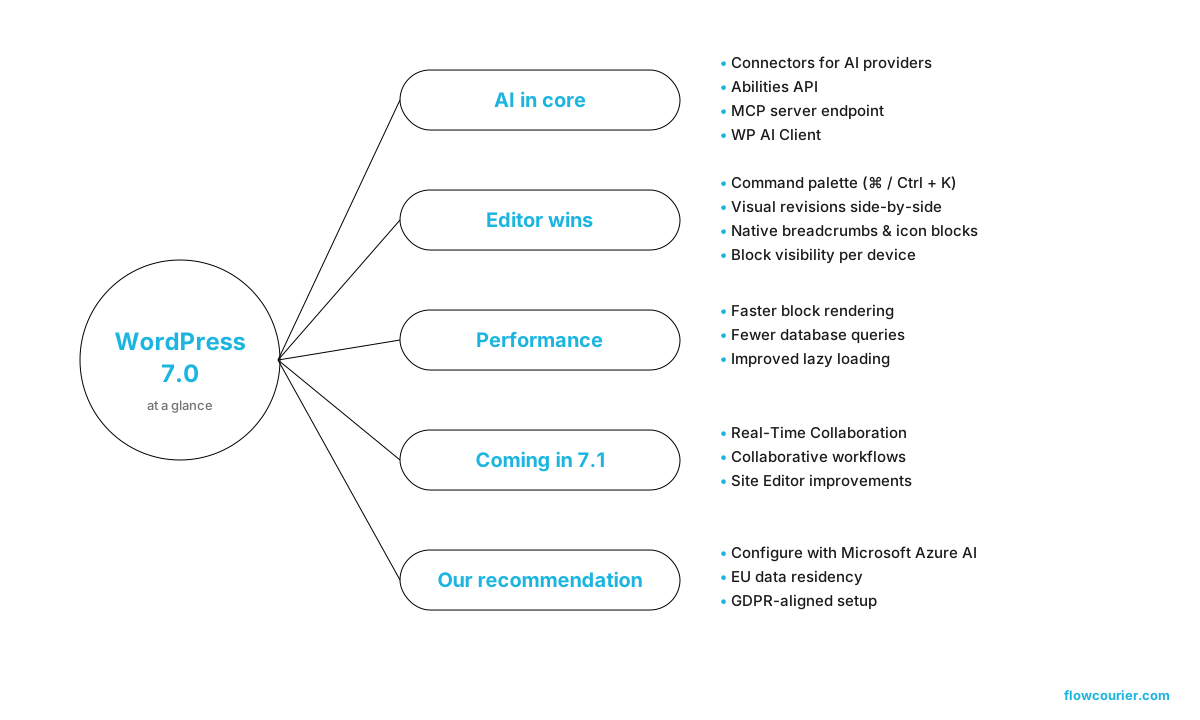
The AI work is the real story. Four pieces matter:
1. Connectors
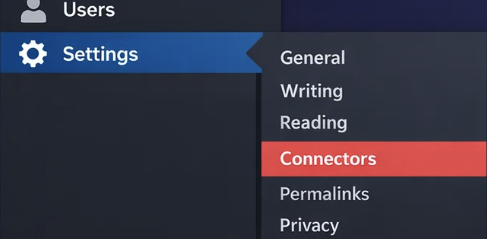
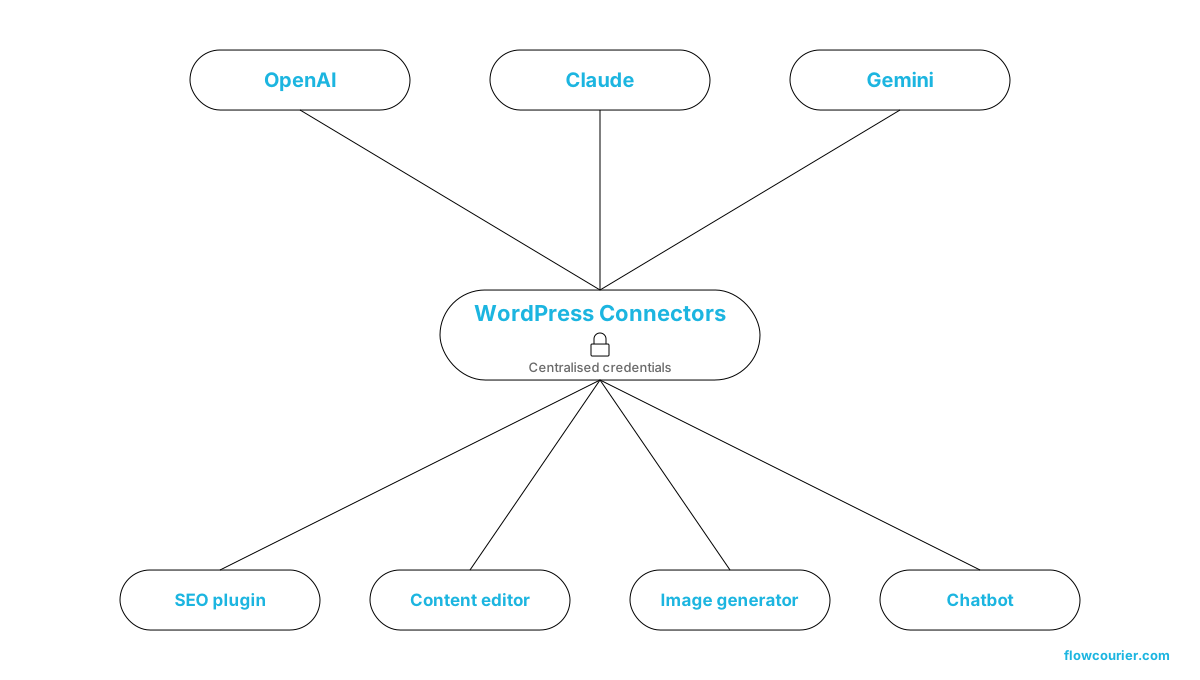
A new "Settings > Connectors" area where you register API credentials for AI providers (OpenAI, Anthropic, Google). Plugins and themes plug into the same providers instead of each shipping their own key management.
2. WP AI Client
A standard client-side library plugin and theme authors use to call AI models in a consistent way, with auth handled by the connector layer.
3. Abilities API
A way for plugins, themes and core to declare "abilities" (capabilities) that AI can discover and use.
4. MCP server
Model Context Protocol exposed on the site itself, so external AI agents can read structure, content, and abilities through a controlled interface.
Outside the AI work, the editor gets useful housekeeping: a command palette (Cmd/Ctrl + K), visual revisions side-by-side, a native breadcrumbs block, a native icons block, block-level CSS, custom fonts for classic themes, block visibility controls per device, and a heading level picker that stops fighting you.
2. Why AI in core matters more than another plugin
WordPress has had AI plugins for two years. Most of them ship their own API key field, their own provider selection, their own prompt config, and their own quirks. The result has been fragmented, and impossible to govern at organisation level.
Three things change when AI sits in core:
A single key, a single audit trail. One Connectors panel. One place to rotate keys, switch providers, or pull access when someone leaves. For agencies and in-house teams managing multiple sites, that's the difference between an unmanageable mess and a real policy.
Plugins compose instead of compete. With a shared client and Abilities API, an SEO plugin can call the same model your content workflow plugin uses, without duplicating credentials or prompt logic. The ecosystem stops re-implementing the same wiring.
MCP turns the CMS into something agents can use. This is the part that's underestimated. With an MCP endpoint, a Claude, Copilot, or internal agent can, under your permission model, read your taxonomy, draft posts in the right format, populate alt text, identify outdated content, or run editorial audits. Not by scraping the front-end, but through a proper protocol that respects your roles and capabilities.
This is where WordPress starts looking less like a CMS and more like a node in an agentic system. The same direction the wider industry is moving, Umbraco's MCP server, Microsoft's Agent Framework, the broader MCP ecosystem.
3. From SEO to AEO: the boring stuff AI actually fixes
Search is splitting. Classic SEO still matters, but a real share of intent now resolves inside answer engines, ChatGPT, Gemini, Claude, Perplexity, Copilot, Google's AI Overviews. AEO (Answer Engine Optimisation) is what gets you cited there.
Both depend on the unglamorous fundamentals: every image with sensible alt text, every page with a real meta description, schema that matches the content, internal links that resolve, content classified consistently. The exact things editors skip when they're under deadline.
The official AI plugin built on top of 7.0's framework handles a lot of this directly: alt text generation, content classification, meta description generation. With your own connector and your own provider, governed by your own permissions. Not magic, just removing the tax that stops the basics getting done.
For B2B sites in regulated markets, most of our clients in Denmark, there's a second dimension: model choice. If you need EU residency and contractual GDPR coverage, you point the connector at Azure AI. If you're fine with US providers calling direct, you have the full menu. The plumbing is the same; the compliance posture is not.
4. Integrations: WordPress as a participant, not an island
This is where our day job lives. Most WordPress projects we touch need to talk to something else, HubSpot, Pipedrive, Klaviyo, Frisbii for subscriptions, e-conomic for accounting, an ERP, a CRM, or a portal sitting on Microsoft Dynamics.
7.0 doesn't replace these integrations, but the MCP endpoint and Abilities API change how the AI layer fits in. A few patterns we're already designing around:
Marketing assistants that read your WordPress content through MCP and propose Klaviyo segments or HubSpot workflows based on what you actually publish.
CRM enrichment where a sales rep asks an agent "what does this prospect's company actually do?" and the agent pulls from both your CRM and your public WordPress content.
Editorial agents that watch new content on WordPress, generate a draft LinkedIn post, and post it back to HubSpot or Pipedrive as a task for review.
The key is that none of this needs custom glue code per integration anymore. MCP is the glue. Your job, and ours, is to design which abilities to expose, to whom, and under what guardrails.
5. Editor-friendly, secure, fast: our checklist for AI-era WordPress
Three things we don't compromise on, regardless of how shiny the new release looks.
Editor-friendly. AI in the editor should remove friction, not add review burden. Alt text should generate on upload, then be reviewed once, not become a new step. Meta descriptions should pre-fill, not pop a modal. The command palette and visual revisions are genuinely useful; pair them with a clean editor configuration and editors will notice the difference inside a week.
Secure. The Connectors model is good news for security, but it shifts the threat surface. API keys are now in a known location with known scopes, make sure backups don't leak them, and rotate on a schedule. The MCP endpoint needs its own access policy: which roles can call which abilities, and what gets logged. Treat it the same way you'd treat a public API.
Most of our WordPress clients aren't technical and have no interest in becoming part-time security admins. That's where our Safeguarding service lives. Monitoring, updates, key rotation, AI governance, performance and integration health, so the people running the business can keep running the business. AI in core adds capability and attack surface in the same move; ongoing care closes the gap.
Fast. AI features must not bloat the front-end. None of the 7.0 AI work runs on page render, it's all admin-side. 7.0 also includes block rendering and database query optimisations that quietly help Core Web Vitals. As always, hosting (Kinsta, WP Engine, Hetzner with proper caching) and image strategy still do most of the work.
6. Planning the update, and why we recommend Azure AI
Updating to 7.0 is more than a version bump. The AI layer is a configuration choice, and that choice carries security, privacy, and compliance implications. A short, honest plan beats a panic.
Our default recommendation: build the AI configuration on Microsoft Azure AI. It's the option that gives clients what they actually need, data residency in EU regions, Microsoft's enterprise governance, no model training on your content, and contractual GDPR commitments through the standard Microsoft customer agreement. For Danish and EU businesses that's the path that lets you adopt the new framework without a separate compliance conversation every time you ship a feature. It also lines up with the rest of the Microsoft stack most of our clients already run, Entra for identity, Azure for hosting, Dynamics or Microsoft 365 for the business systems WordPress needs to talk to.
From there, the plan looks like this:
Audit your current AI plugins. Which can be retired once core handles connectors? Which are doing something genuinely additional? Don't end up with three parallel AI stacks.
Configure the Azure AI connector. Point Connectors at your Azure deployment. One set of keys, EU-hosted, governed centrally, auditable.
Map your abilities and MCP exposure. What do you actually want agents to be able to do? Read public content only? Read drafts? Trigger imports? Define this on paper first.
Test on staging. Standard practice for any major release. The 7.0 changelog is large; some themes and older plugins will need updates.
Plan an SEO/AEO sweep. Once the AI tooling is in place, run it across your back catalogue for alt text, meta descriptions, and content classification. One of the highest-leverage uses of the new framework on day one.
7. Next step
At Flowcourier we build WordPress, Umbraco, and Uniform solutions for clients who care about integrations, automation, and outcomes. WordPress 7.0 fits naturally into how we work, AI as a controlled layer on top of a proven platform, connected cleanly to the rest of your stack. After launch our Safeguarding service keeps the site running, updated and secure. One point of contact.
If you'd like a no-obligation review of what 7.0 means for your specific site, current plugins, integrations, editor workflows, AEO readiness, we're happy to spend half an hour on it.
