

AI crawler analytics
AI crawler analytics
Section titled “AI crawler analytics”Flowcourier AEO recognises the user agents of 150+ AI crawlers — OpenAI (GPTBot, ChatGPT-User, OAI-SearchBot), Anthropic (ClaudeBot, Claude-User, Claude-SearchBot), Perplexity, Google-Extended, Meta, Apple, Common Crawl, Bytespider and the long tail besides — and records every visit: which bot, which path, response status, whether it was served HTML, Markdown, llms.txt or robots.txt, and a verification verdict (verified / spoofed / unverifiable — see Crawler verification & blocking).
Spoofed hits — vulnerability scanners wearing an AI user agent — are blocked, excluded from the traffic aggregates below, and reported separately, so the numbers you see are real crawler traffic.
The AI Traffic view
Section titled “The AI Traffic view”Open Analytics → AI Traffic in the backoffice. With Flowcourier Analytics installed this view is a tab in the Analytics section; on a site running AEO alone it is under Settings → Flowcourier → AEO Dashboard.
It has four tabs — Overview, Top pages, Crawler log and Referrals — sharing one date range with every other Flowcourier Analytics view. Crawler fetch → assistant citation → human arrival is one funnel, so it is one view.
- Hits per crawler, with operator and purpose — training, AI search, or live assistant fetches — so you can tell “a model is being trained on my content” apart from “a user asked an assistant about my site right now”. A filter box narrows the table as you type.
- HTML vs Markdown ratio — is your AEO surface actually being used?
- Top pages the crawlers fetch, with a search box that looks up any page’s crawler hits — not just the visible top 10.
- A Verification box showing, per impersonated crawler, how many hits verified against the vendor’s ranges versus proved spoofed.
- A recent-visits log with per-hit verdict badges (verified / spoofed / unverifiable).
- A “Spoofed requests blocked” counter and a distinct “Spoofed” slice in the traffic-share donut.
- Today, 7-day and 30-day views.
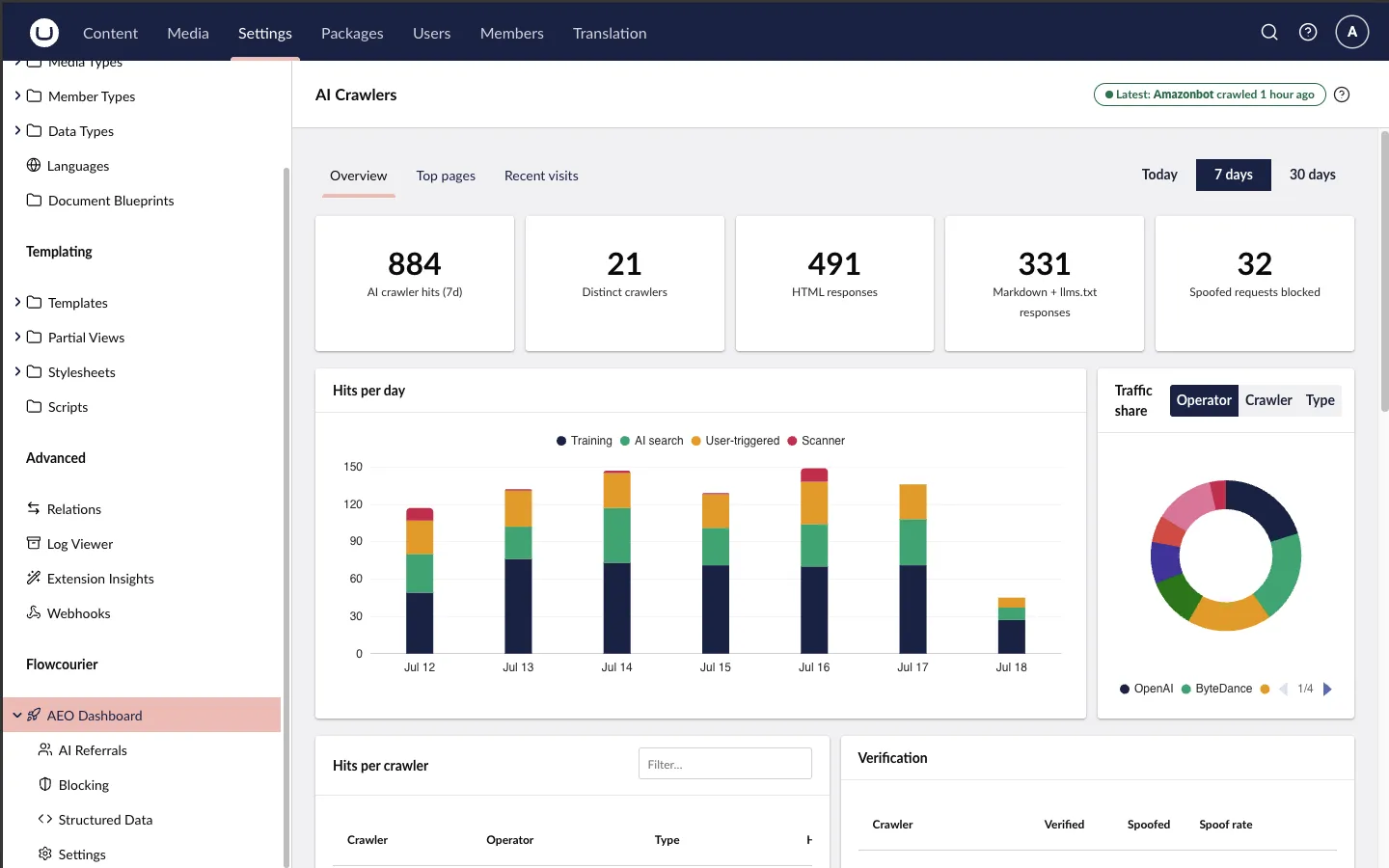
Referrals is the fourth tab of this view. The Blocking page, the Structured Data form and the read-only settings page are always under Settings → Flowcourier — they are configuration, not measurement — in a group named AEO when Flowcourier Analytics is installed and AEO Dashboard when it is not.
What the crawler types mean
Section titled “What the crawler types mean”Every crawler carries a Type — shown in the per-crawler table, and as a grouping in the Traffic share donut (the Type option). The type describes why the bot is fetching your pages, and each one means something different for your AI visibility:
-
Training — the crawler is collecting pages to build a model-training corpus (GPTBot, ClaudeBot, Bytespider, CCBot, Google-Extended, …). Your content may end up baked into a future model’s knowledge, but there’s no attribution and no click back to you. It’s a long-term, diffuse benefit at best — the model might “know about” your site months later, with no way to trace it.
-
AI search — the crawler is building an AI search/answer index (OAI-SearchBot, PerplexityBot, Claude-SearchBot, Amazonbot, …). This is the one that matters most for AEO: these indexes are what ChatGPT Search, Perplexity and Claude’s web search draw from when composing answers, and they typically cite the source. Being crawled here is roughly the AI equivalent of being indexed by Googlebot.
-
Assistant — a live, on-demand fetch made on behalf of a real user’s prompt (ChatGPT-User, Claude-User, Perplexity-User, MistralAI-User, …). Someone asked an AI assistant a question and it went and read your page right now to answer it. These are the closest thing to actual human traffic in the table — each hit generally corresponds to a real person seeing your content summarized or cited in their chat.
Practically: treat AI search and Assistant hits as your AEO success
metrics — they translate into citations and real readers. Training traffic
is the one to weigh against your content strategy; if you’d rather not feed
model corpora, block those crawlers on the
Blocking page
(an enforced 403, unlike robots.txt).
Reading the rest of the dashboard
Section titled “Reading the rest of the dashboard”- Stat cards — total hits from real (verified or unverifiable) crawlers, distinct crawlers seen, HTML vs Markdown+llms.txt responses, and spoofed requests blocked in the selected window.
- Hits per day / per hour — the bar chart zero-fills quiet days, so gaps are real “no crawler came” periods, not missing data. The Today view switches to hourly bars. When intent data is available the bars stack by intent — Training, AI search and User-triggered (the per-hit form of the three crawler types above, where User-triggered is an Assistant-type fetch), plus a Scanner bucket for spoofed probes — so a scan wave reads differently from a burst of real assistant fetches. (Hits recorded before intent classification show as “Unknown”.)
- Traffic share — group by operator (who runs the crawlers: OpenAI, Anthropic, Google…), by crawler (individual bots), or by type (the three categories above). The long tail collapses into “Other”; spoofed traffic appears as its own visually distinct slice, never mixed into the real crawler shares.
- Hits per crawler — every crawler seen in the window with operator, type
and hit count. The filter box matches crawler name, operator and type
label, so typing
assistant,trainingorAnthropicnarrows to that whole group — and the bars stay scaled to the unfiltered maximum, so proportions remain comparable while you filter. - Verification — per impersonated crawler: verified hits, spoofed hits and the spoof rate. A high spoof rate on a crawler name tells you scanners favour that disguise; it says nothing bad about the real crawler.
- HTML vs Markdown ratio — a rising Markdown/llms.txt share means crawlers are discovering and preferring your AEO surface, which is exactly what you want: cleaner input for the models, cheaper rendering for you.
- Top pages — which content the crawlers actually pull. The list shows the top 10; the search box queries every crawled path in the selected range (case-insensitive, up to 50 matches ranked by hits, respecting the Today / 7 / 30-day toggle), so you can answer “do AI crawlers ever fetch this specific page?” directly. Spoofed hits are excluded, like everywhere else. If your key landing pages aren’t here but your archive is, that’s a signal to review your llms.txt inclusion rules.
- Crawler log — the raw log: timestamp, crawler, path, verification verdict badge, what was served, and status code.
Where the crawler list comes from
Section titled “Where the crawler list comes from”The built-in list is derived from the community-maintained ai.robots.txt dataset and refreshed with each package release — so as new AI crawlers appear and that project adds them, they arrive in the next AEO version. Flowcourier curates a layer on top: the training / AI search / assistant category for the major vendors, and the verification descriptors (published IP ranges and reverse-DNS suffixes) that back spoof blocking — data ai.robots.txt doesn’t carry.
The list does not update itself between releases. If a brand-new crawler
shows up before we ship it, add it yourself with
CrawlerAnalytics:AdditionalBots — no release needed.
Likewise, DisabledBots mutes any built-in you don’t care to track. Your config
always wins over the built-in list.
Built for production safety
Section titled “Built for production safety”- Never slows a request down — matching is a cheap in-memory scan; hits go into a bounded queue and a background writer persists them in batches (one short transaction per flush, SQLite-friendly). Under pressure, hits are dropped rather than queued unboundedly.
- GDPR-safe by default — out of the box the analytics store no IP addresses and no query strings, and raw user agents are kept only as forensics on spoofed or failed-verification requests (where the parsed bot id can’t be trusted). Site owners can opt in to storing addresses per hit via
IpStorage— truncated (/24, /48), daily-salted hash, or full. The one table that always stores IPs is the security block list, retention-bound. - Pages, not assets — a crawler’s fetches of stylesheets, scripts, images, fonts and media are not recorded (opt in with
RecordStaticAssets), so one page view is one row rather than one per asset. Blocking applies to every request regardless. - Bounded storage — a daily job prunes hits older than
RetentionDays(default 90) in short batches, so even a large backlog never holds the database’s writer lock; theFcAeoCrawlerHittable is created automatically on startup.
appsettings reference
Section titled “appsettings reference”All settings live under Flowcourier:Aeo:CrawlerAnalytics and are optional:
{ "Flowcourier": { "Aeo": { "CrawlerAnalytics": { "Enabled": true, "RetentionDays": 90, "IpStorage": "None", "AdditionalBots": [ { "Id": "mybot", "Name": "MyBot", "Vendor": "Acme", "Category": "search", "UserAgentToken": "MyBot" } ], "DisabledBots": [ "bytespider" ] } } }}| Setting | Default | Description |
|---|---|---|
Enabled |
true |
Record AI-crawler visits and serve the dashboard data. |
RetentionDays |
90 |
Days of hits to keep (pruned daily); 0 keeps everything. |
FlushIntervalSeconds |
15 |
How often the background writer flushes queued hits (one batched transaction per flush). |
MaxBatchSize |
200 |
Maximum hits written per flush transaction. |
QueueCapacity |
5000 |
In-memory queue size between requests and the writer; overflow is dropped, never blocking a request. |
RecordStaticAssets |
false |
Record crawler fetches of static assets (stylesheets, scripts, images, fonts, media) as hits. Off, one page view is one row rather than one per asset; HTML, Markdown, llms.txt, robots.txt, PDFs, feeds and sitemaps are always recorded, and blocking applies to every request either way. |
AdditionalBots |
[] |
Extra crawlers to track: { Id, Name, Vendor, Category, UserAgentToken }. Category is training, search or assistant (shown as Training / AI search / Assistant). |
DisabledBots |
[] |
Ids of built-in crawlers to stop tracking (e.g. bytespider). |
IpStorage |
None |
Whether and how the client address is stored per hit. None (default) stores no address at all; Truncated (/24, /48), Hashed (daily-salted) or Full opt in to scanner-cluster forensics. Verification always compares full addresses in memory regardless of this. |
ClientIpHeader |
null |
Header carrying the real client address when a trusted edge injects one (e.g. Cloudflare’s CF-Connecting-IP); default uses the connection’s remote address. The package never parses X-Forwarded-For itself. Behind a CDN this setting is essential — see Cloudflare & CDNs. |
CountryHeader |
null |
Header carrying a two-letter country code from a trusted edge (e.g. CF-IPCountry); default records no country. |
ProbePathPatterns |
/., appsettings, wp-, _profiler, elmah.axd, /telescope/ |
Case-insensitive path substrings that mark a spoofed request as a vulnerability scan (intent scanner). Configured entries are added to the defaults. |
Two more CrawlerAnalytics settings — ReferralHosts and ReferralRetentionDays — drive the AI referrals feature and are documented there.