

Translation Pro
Translation Pro
Section titled “Translation Pro”The free Translation Agent covers single-page translation end to end. Translation Pro is for translating at scale — a larger number of pages, whole sections, entire sites — and adds three capabilities on top:
- Multi-page translation — the Translation Agent view under Translation → Flowcourier translates many pages (optionally including all children) in one run, with one approval email covering the whole batch. Without a license the view shows the language buttons disabled; single pages can always be translated free from the page editor’s Copilot.
- Azure Translator engine — machine translation across more than 100 languages through your own Azure Translator (NMT) resource instead of the LLM chat profile: deterministic, consistent output, fast, and typically far cheaper for bulk translation. The right engine when accuracy and cost matter across large batches.
- Termbase — a glossary of approved translations and do-not-translate terms, enforced on every translation.
Pro ships inside the free Translation Agent package — there is nothing extra to install. A license key unlocks it.
Free vs Pro
Section titled “Free vs Pro”| Free | Pro | |
|---|---|---|
| Single-page translation from the Copilot | ✓ | ✓ |
| Review workflow, reminders, Translation Workflow dashboard | ✓ | ✓ |
| Dictionary item translation | ✓ | ✓ |
| Translation engine | Umbraco AI chat profile (LLM) | Chat profile or Azure Translator (100+ languages) |
| Multi-page / entire-site batch translation | — | ✓ |
| Termbase with enforced terminology | — | ✓ |
To get a license or trial key, contact us through flowcourier.com.
License key
Section titled “License key”Your license is a signed FC1.… key validated fully offline — no license server, nothing phones home, air-gapped hosting works. Install it in appsettings.json (or the equivalent environment variable):
{ "Flowcourier": { "Licenses": { "TranslationPro": "FC1.eyJ..." } }}Good to know:
- Keys are bound to your domains. Local development hosts (
localhost,127.0.0.1,*.local) always work, so one key covers production and every developer machine. - Keys are bound to the Umbraco LTS cycle they were purchased for (for example Umbraco 17 through 20). Upgrading to the next LTS requires a new license — typically part of your upgrade project.
- Trial keys work the same and simply carry an expiry date.
- Your site never breaks over licensing. Without a valid key, translation keeps working exactly like the free package: the chat-profile engine translates, and any termbase data you created stays readable and exportable (only changes are blocked). The current license state — and the specific reason when Pro is inactive — is always visible under Settings → Flowcourier → Translation Pro and as a banner on the Pro dashboards.
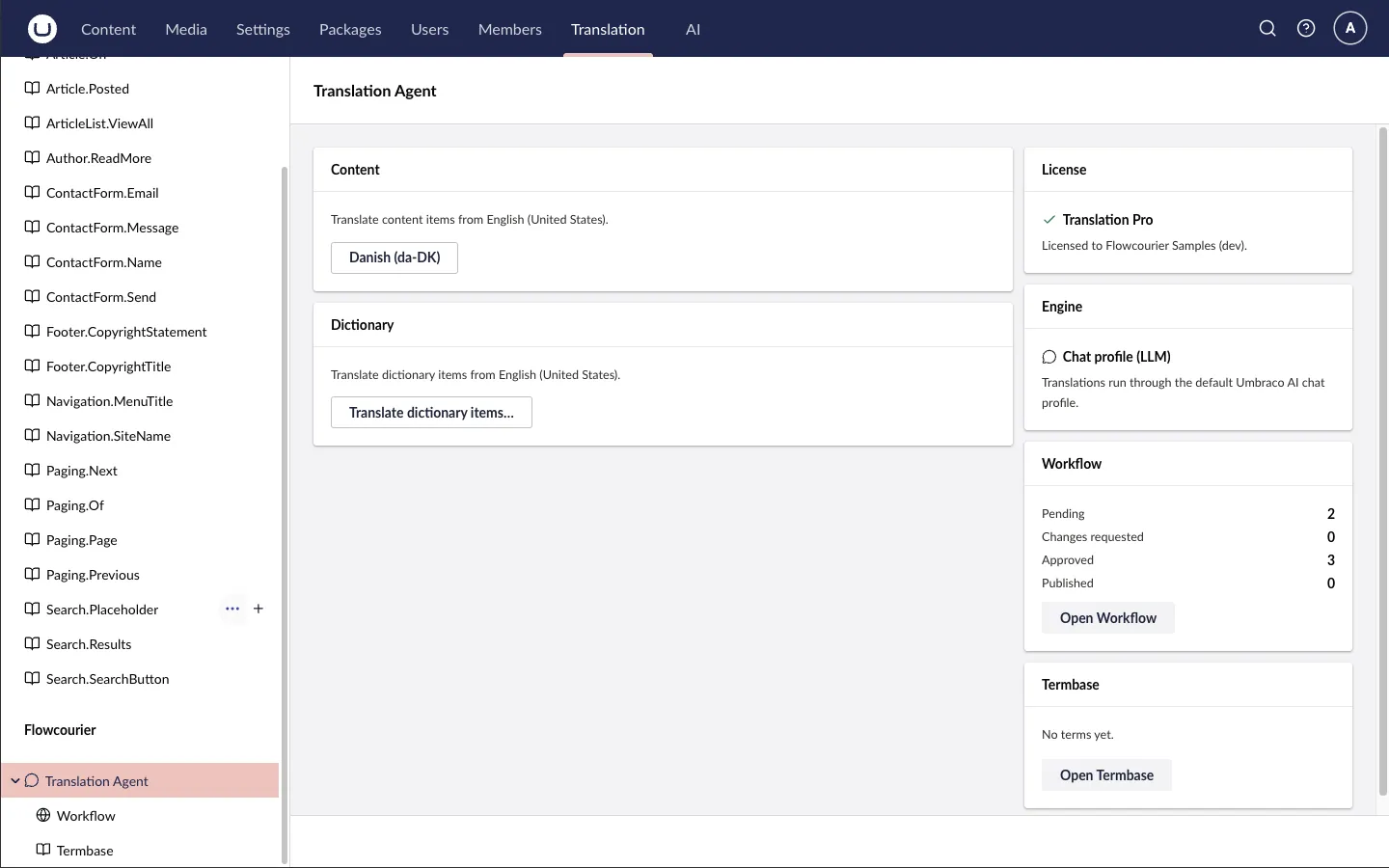
The Translation Agent view under Translation → Flowcourier shows the same at a glance: who the key is licensed to, which engine translations currently run through, the review queue and the size of the termbase.
Azure Translator engine
Section titled “Azure Translator engine”The engine calls the Azure Translator Text API in your own Azure subscription — content is sent only to your resource, never through Flowcourier.
1. Create the Translator resource
Section titled “1. Create the Translator resource”In the Azure portal: Create a resource → Translator (an Azure AI services resource of kind TextTranslation), pick a region close to your hosting, and choose a tier — F0 is free (2M characters/month), S1 is pay-as-you-go. Then copy a key and the region from the resource’s Keys and Endpoint blade.
Prefer infrastructure-as-code? This Bicep provisions the same thing:
param name stringparam location string = 'swedencentral'param sku string = 'S1' // F0 = free tier, 2M chars/month
resource translator 'Microsoft.CognitiveServices/accounts@2024-10-01' = {  name: name  location: location  kind: 'TextTranslation'  sku: { name: sku }  properties: {    customSubDomainName: name  }}
output region string = translator.locationaz deployment group create --resource-group my-rg \ --template-file translator.bicep --parameters name=my-site-translatoraz cognitiveservices account keys list --resource-group my-rg --name my-site-translator2. Configure and select the engine
Section titled “2. Configure and select the engine”{ "Flowcourier": { "Translation": { "Engine": "azure-translator" }, "TranslationPro": { "AzureTranslator": { "ApiKey": "<key from Keys and Endpoint>", "Region": "swedencentral" } } }}| Setting | Default | Purpose |
|---|---|---|
Endpoint |
https://api.cognitive.microsofttranslator.com |
The global endpoint works for any resource; use a geographic endpoint to keep traffic inside a region. |
ApiKey |
(required) | From the resource’s Keys and Endpoint blade. |
Region |
(empty) | Required for regional resources (sent as Ocp-Apim-Subscription-Region). |
Category |
(empty) | Optional Custom Translator category id — translations then come from your trained custom model. |
Verify the connection from Settings → Flowcourier → Translation Pro (Test connection sends a canary string, never your content). A Translation Engine health check (Settings → Health Checks) warns whenever the selected engine is unregistered, unlicensed or misconfigured.
How it behaves
Section titled “How it behaves”- Values are batched within the service limits (one request carries up to 90 values), so a typical page is a handful of requests instead of one LLM call per field. HTML is sent as
textType=html— tags are preserved by the service. - Failures never leave fields empty: if a request fails (wrong key, quota, outage), the affected values fall back to the source text and the run continues; the run log names the reason.
- NMT cannot follow prose instructions, so a configured knowledge Context (
KnowledgeContextAlias) is skipped with a logged note. Termbase terms are enforced through the service’s dynamic dictionary — when English is one side of the language pair (an Azure Translator limitation, reported in the log otherwise). - If the engine is selected but unlicensed or misconfigured, translation silently falls back to the chat-profile engine — the health check, the settings page and the log tell you why.
Termbase
Section titled “Termbase”The Termbase lives under Translation → Flowcourier → Termbase: approved translations per language pair, do-not-translate terms (brand names), case sensitivity, notes, and CSV import with a validating dry run. Terms are enforced on every translation — as prompt directives for the chat-profile engine, as dynamic-dictionary markup for Azure Translator (English pairs).
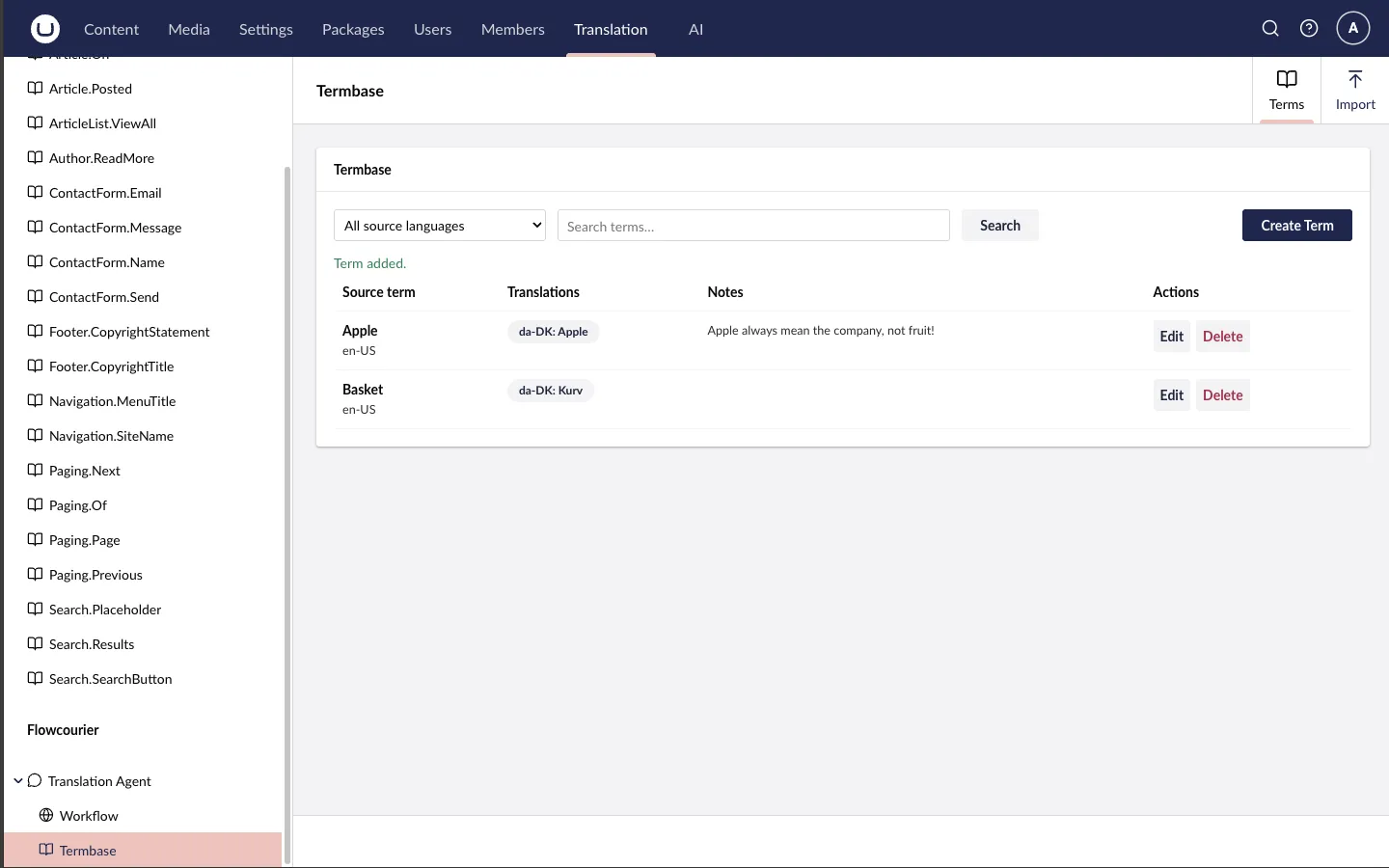
Filter by source language or search the terms, add them one at a time with Create Term, or bring a whole glossary in from the Import tab. What reaches the engine is the rule itself — translate “Basket” as “Kurv”, keep “Apple” as written. The Notes column is for the people maintaining the glossary: it records why a term is on the list, so the next editor does not undo it.
CSV import columns: sourceLang,sourceTerm,targetLang,targetTerm,dnt,caseSensitive,notes.
Your termbase data is yours: whatever the license state, it stays readable and exportable.